Software agents waste thousands of words reading web forms before typing a single character
By compressing document layouts and batching multi-step browser tasks into single turns, a new interface server slashes the conversational bloat that stalls autonomous online assistants.
Why do automated assistants struggle with ordinary web forms?
When an automated software assistant navigates the internet on behalf of a human user, it does not see a browser interface the way a person does. A human user glances at an online job application or registration portal, spots the empty input boxes, and fills them out in seconds. An automated language model, by contrast, must inspect the underlying code structure of the webpage, translate visual forms into long text descriptions, and deliberate over each individual interaction.
Most browser-automation systems built around the Model Context Protocol operate through fine-grained, step-by-step commands.12 Every time an agent clicks an input box, types a word, chooses an item from a drop-down menu, or checks a confirmation box, it sends a discrete message across a communication bridge.12 In response, the browser controller captures the entire updated structure of the webpage and transmits that complete layout back to the model.12
This communication pattern creates an escalating computational bottleneck. Language models evaluate text through discrete numerical fragments known as tokens, where a typical token represents a few characters or part of a word. When a webpage updates, sending the complete accessibility layout back into the agent's memory forces the conversation history to expand rapidly.12 During multi-step interactions, an automated agent must re-read the entire preceding conversation, including every repeated page snapshot, before deciding its next move. A routine ten-field application form can quickly swell the running dialogue to tens of thousands of tokens, multiplying computing expenses and causing multi-second pauses between every mouse click.
What happens when an automated agent interacts with a webpage?
The operational chain of automated web browsing follows a strict causal sequence that breaks down when interactions are handled one field at a time. First, the browser loads the remote webpage and constructs the document object model, which is the internal tree structure organizing every header, paragraph, button, and input element on the screen. Second, an automation server scans that internal tree to produce an accessibility tree, which is a text-based inventory listing all interactive controls and labels for the language model. Third, the model ingests that entire text inventory, identifies the element it wants to modify, and issues a remote command to click or type. Fourth, the browser executes that single command and registers any immediate changes to the interface. Fifth, because modern websites run dynamic JavaScript code that can alter the interface after any keystroke, the server captures a fresh snapshot of the entire layout and feeds it back into the model to prepare for the next step.
Repeating this five-step cycle for every individual form control rapidly degrades performance. When an agent fills an address line, the server returns thousands of words describing every unaffected element on the page, from navigation headers to footer links. When the agent moves to the next field, the browser re-evaluates the same unchanged elements. If an agent must also upload a document, standard automation tools typically encode the binary file into thousands of characters of inline text within the instruction itself.21 As each interaction appends another large snapshot to the active conversation history, the language model spends the majority of its computational effort re-reading static parts of the page that never changed.
Software developer Trung Thanh Tran released an open-source automation server called Turbo-Browser-MCP to address this structural inefficiency in browser-based artificial intelligence workflows.21 The system redesigns how automation tools report visual changes to language models by replacing repetitive whole-page scans with compact differential updates. Rather than requiring an artificial intelligence agent to orchestrate twenty-five to thirty-three discrete browser commands sequentially, the architecture consolidates routine browsing routines into ten batched tools.13 The tool operates as a specialized server on top of the Playwright browser automation framework, targeting the communication overhead between large language models and headless web browsers.12
How does differential layout inspection cut token waste?
Differential layout inspection eliminates conversational waste by transmitting only the specific interface elements that alter their state following a user action.12 The server assigns deterministic numeric reference identifiers to every interactive control across the main page frame, nested inline frames, and shadow document boundaries.21 When an action occurs, the inspection engine hashes the signature of each line across the layout tree, tracking structural tags, labels, and input values.2 If a button click simply opens a notification message or toggles an error label, the server returns only those fifty or sixty tokens of modified text, rather than re-sending thousands of tokens describing the surrounding interface.
To evaluate these efficiency gains, Tran established an automated local benchmark suite running headless Chromium, measuring exact token counts using the OpenAI o200k_base tokenizer.12 In a dense software console containing 140 buttons, a standard raw code representation required 18,654 tokens, while a conventional full accessibility layout consumed 3,568 tokens.1 The compact inspection tool compressed that initial layout to 1,135 tokens, achieving an immediate 68.2 percent reduction relative to the full accessibility baseline and a 93.9 percent saving relative to raw markup.1 When evaluating a post-click state change where only a minor interface element updated, the differential mode emitted 56 tokens of modified lines in 18 milliseconds, representing a 98.4 percent token reduction compared with a 3,582-token full accessibility rescan.1
Form filling demonstrates an even larger cumulative efficiency gain by combining element manipulation into single-turn execution. In standard multi-turn workflows, an agent addressing a ten-field form makes eleven sequential turns, spending 574 milliseconds of local browser execution time while accumulating 12,197 direct tokens and 72,614 cumulative conversation tokens as prior turns replay in history.1 Tran reported that the consolidated smart filling tool completed all ten fields and generated an inline verification snapshot in one turn lasting 82 milliseconds, using 811 tokens.2 This consolidated execution ran seven times faster in local browser execution time while eliminating 93.4 percent of direct tokens and 98.9 percent of cumulative conversation tokens.12 Because modern reasoning models require two to five seconds of inference time per turn, avoiding ten intermediate round-trips removes twenty to fifty seconds of conversational latency.14
Handling local file attachments directly through the host filesystem resolves another significant token drain. When browser agents submit resumes or attachments using inline data representations, an ordinary 48-kibibyte document encoded as text consumes 44,728 tokens within the tool arguments.1 The server instead routes local file paths directly into the browser file chooser, requiring only 85 tokens to point to a disk location in 68 milliseconds, eliminating 99.8 percent of the data overhead.12
How can automation prevent unauthorized form submissions?
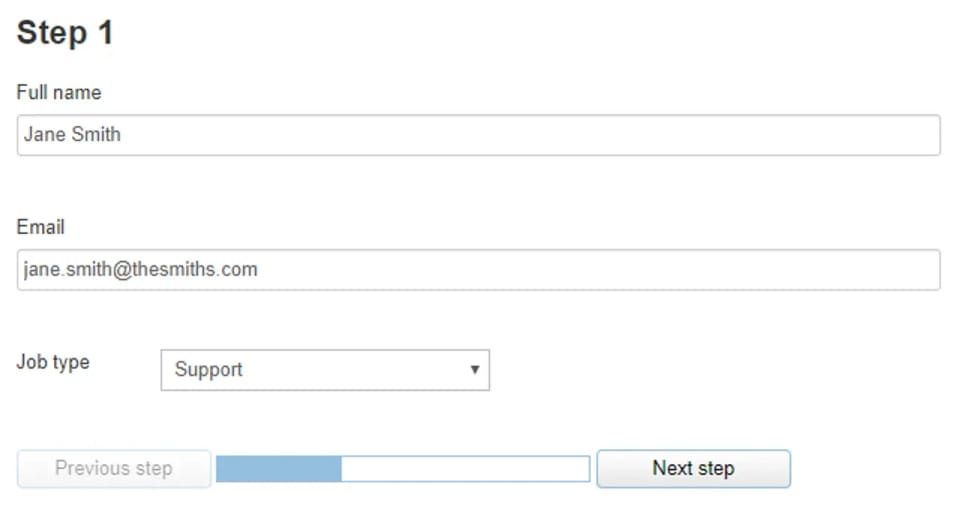
Automated safety mechanisms prevent unintended form submissions by intercepting final dispatch actions before data reaches a remote web server.12 When an artificial intelligence agent operates autonomously across multi-page workflows, a single erroneous click on an application control can submit partial or unverified information. The server implements an automated submit guard that defaults to blocking actions that match final submission patterns, including buttons labeled with submission verbs or programmatic form triggers. This barrier holds until an external caller explicitly provides permission to finalize the action.
The guard analyzes document controls, accessibility names, implicit keyboard submissions, and script-level submission calls across both main pages and embedded frames.13 It specifically monitors labels associated with permanent publishing, messaging, application filing, and financial checkout transactions, including corresponding international phrasing. When an agent clicks screen coordinates rather than naming an element, the server resolves the underlying control at those coordinates before allowing the mouse action to proceed.2 Legitimate progression buttons in multi-step application wizards, such as controls that advance between pages or save preliminary drafts, remain permitted through explicit safe-listing patterns unless dangerous compound terms are detected.2
The internal architecture also addresses modern user interface frameworks like React, which maintain private state trackers behind interactive form inputs. Direct programmatic value modifications in automated browsers frequently vanish when an element loses focus because framework state listeners do not register the raw property adjustment.2 The server bypasses this limitation by setting values through the native prototype setter while resetting internal tracker properties, subsequently dispatching genuine synthetic input and change events to force framework synchronization.21
What are the operational boundaries of batched automation?
These benchmark findings represent controlled local measurements rather than real-world internet browsing speeds. The test suite evaluated performance inside local headless Chromium fixtures with fixed network delays, meaning the reported execution speeds do not account for external web server latency, erratic mobile networks, or heavy remote infrastructure loads.2 While the tool reduces asset overhead by blocking unnecessary media through specialized filtering presets, remote server response times remain outside the software's control.21
The system also encounters technical constraints when dealing with complex dynamic interfaces. For example, closed shadow document trees that were already established on existing browser sessions before the tool attaches its monitoring scripts cannot be intercepted cleanly, forcing the agent to rely on coordinate clicks and fallback keyboard inputs.12 Similarly, virtualized selection components that defer mounting interactive choices into the document tree until a human user physically scrolls or types into an inner search field can evade immediate batch targeting.2
Looking ahead, software agents will increasingly need to navigate dynamic web applications without human intervention or excessive computational overhead. Collapsing granular browser interactions into structured, high-level commands demonstrates that artificial intelligence agents do not require an exact simulation of human motor actions to browse effectively. As autonomous systems take on more complex data entry and web research assignments, optimizing the boundary between language models and browser engines will determine whether automated agents remain slow experimental tools or become practical daily utilities.
The record
31 sentences trace to 4 sources.
- 1 Show HN: Turbo-Browser-MCP – Batch forms, DOM deltas and submit guards for MCP See the source
- 2 Building a Faster Playwright MCP Server: Compact DOM Deltas, 1-Turn Form Filling, and Submit Guards See the source
- 3 GitHub - Tthanh2k6/turbo-browser-mcp: High-speed Playwright MCP server with multi-tab batching, compact delta DOM snapshots, React/Shadow DOM/iframe form filling, disk file uploads, and submit guards See the source
- 4 Show HN: Turbo-Browser-MCP – Batch forms, DOM deltas and submit guards for MCP See the source